We are living in a true multi-cloud era. With every hyperscaler introducing new services, platforms, and AI capabilities, choosing a cloud provider is no longer easier than ever – in fact, it has become more complex. Organizations must now evaluate performance, AI readiness, resilience, portability, and cost before making long-term cloud decisions.
Many organizations initially adopted Amazon Web Services because it entered the market earlier than most competitors. However, modern cloud strategy goes far beyond first adoption. If your organization needs to move workloads, build disaster recovery in another cloud, or design a highly resilient and highly available architecture, you must evaluate multiple cloud providers – not just one. Pricing is also a critical factor, especially when running workloads across regions and cloud platforms.
For organizations planning to move workloads or establish replication in another cloud, Oracle provides a powerful solution through its Cloud Migration Service in Oracle Cloud Infrastructure (OCI).
Oracle Cloud Migration Service – What It Provides
- Automated virtual machine migration from AWS to OCI
- Migration of VMware environments from on-premises or cloud, including VMware, into OCI
- Agent-based or agentless migration approaches
- Continuous replication with minimal downtime
- Guided, step-by-step migration workflows
- Environment discovery and dependency mapping
- Bulk migration support at scale
- Cost-efficient lift-and-shift migration model
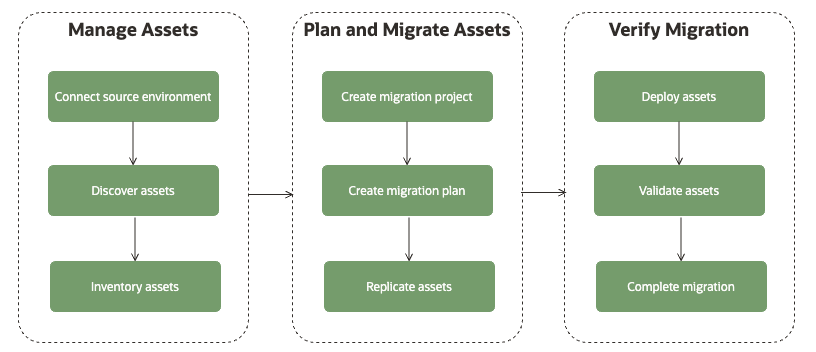
Oracle Cloud Migration Workflow.
The Oracle Cloud Migrations workflow is comprised of three primary phases.
In this article, I’ll walk you through how to set up the Oracle Cloud Migration Service to enable seamless database migration between AWS and Oracle Cloud Infrastructure (OCI).
Before we begin the configuration, let’s review the key prerequisites required to ensure a smooth setup.
Prerequisites
Note: The Oracle cloud migration stack will create respective compartments and assign the necessary privileges.
1. Establish Network Connectivity (AWS ↔ OCI)
You must configure a secure VPN connection between your AWS environment and OCI.
This ensures private and encrypted communication between the source (AWS) and target (OCI) environments.
- Site-to-Site VPN or FastConnect (if required)
- Proper routing configuration
- Security list / Security Group rules allowing required ports
Without stable connectivity, the migration agent will not be able to communicate with the source or target systems.
For setting up a secure VPN connection between AWS and OCI, you can follow the detailed guide provided here: Setting up Secure Site-to-Site VPN Connectivity from OCI to AWS Transit Gateway
2. Install Oracle Cloud Migration Stack
Deploy and configure the Oracle Cloud Migration Stack in your OCI tenancy.
This stack automatically provisions and configures the required components, including:
- Object Storage (for staging and replication data)
- Required IAM policies and privileges
- Dedicated compartments for migration resources
During the deployment, two main compartments will be created:
- Migration – Used to host migration-related resources such as jobs, assets, and replication configurations.
- Migration Secrets – Used to securely store credentials, including access keys required for AWS replication.
The Migration Secrets compartment ensures that sensitive information (such as secret keys) is securely managed and isolated from other resources.
3. Grant Required Privileges on AWS
On the AWS side, the necessary IAM permissions must be granted to allow:
- Access to source instances
- Access to storage
- Metadata discovery and Cost information
- Required API interactions
Make sure the IAM policy follows the principle of least privilege while still allowing the migration agent to function properly.
4. Create a Secret Key for the AWS User
You need to generate an Access Key and a Secret Key for the AWS IAM user that the migration agent will use.
Steps:
- Navigate to IAM in AWS
- Select the respective user
- Generate Access Key
- Securely store the Secret Access Key
5. Create Asset discovery
Install Oracle Cloud Migration Stack.
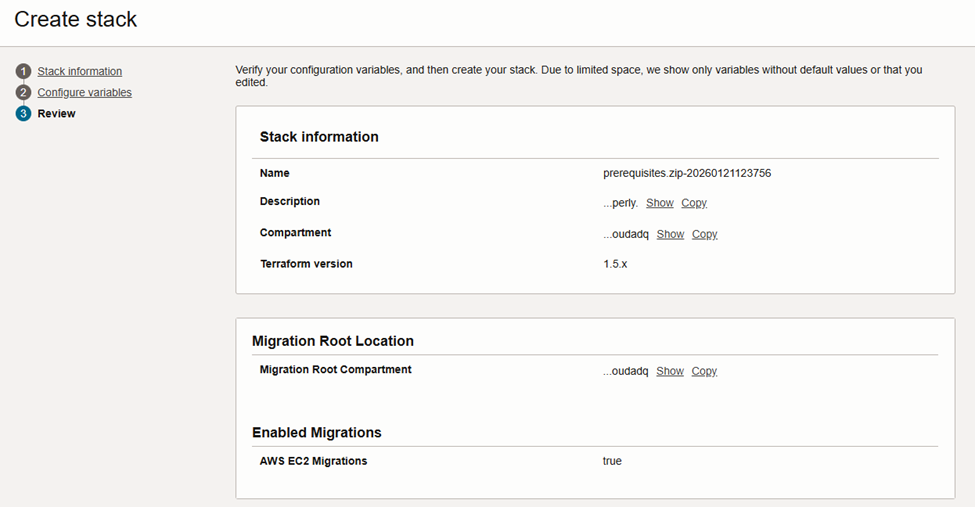
Installing the Oracle Cloud Migration Stack is a straightforward and guided process within OCI. Oracle provides a pre-built Resource Manager stack that automates most of the required setup, making deployment simple and consistent.
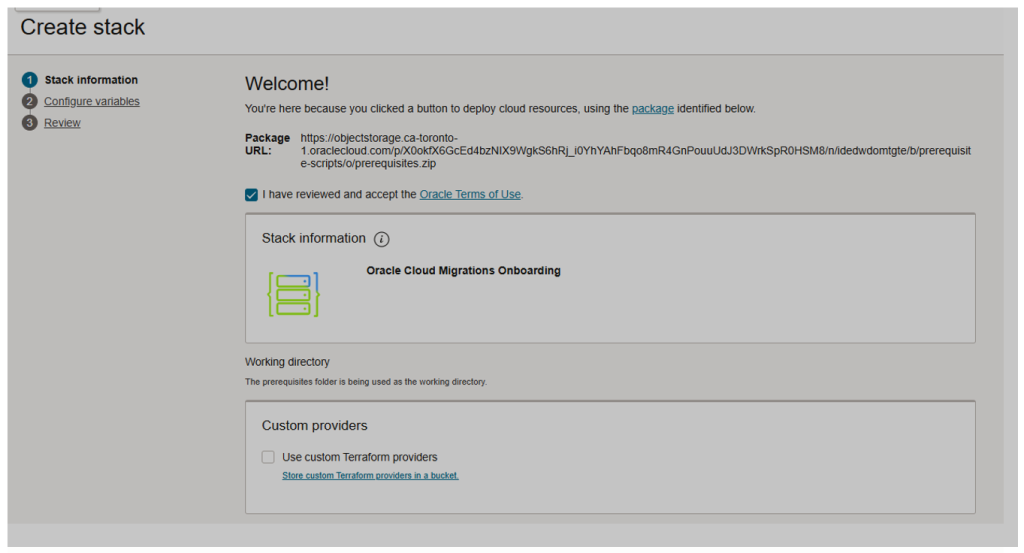
It’s important to select the appropriate migration type based on the workload and platform you’re planning to move.
For example, if you’re running a VMware environment and considering moving away due to rising licensing costs, Oracle Cloud Migration Service provides a practical alternative. You can migrate workloads directly from your VMware setup to OCI, converting them into native OCI virtual machines.
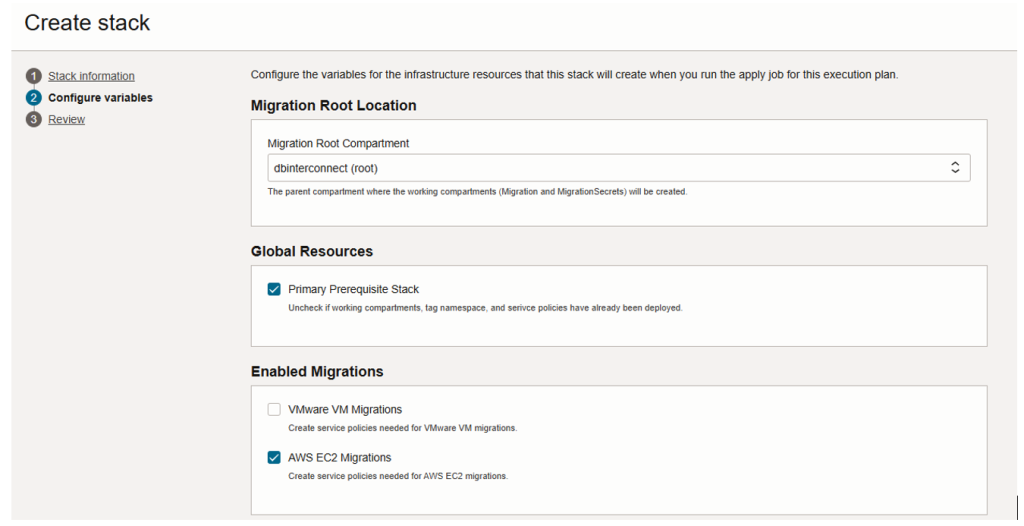
From here, you can proceed with installing the Migration Stack.
Once you confirm the configuration and required permissions, initiate the installation. The Migration Stack will be deployed in your OCI environment and will handle the discovery, replication, and orchestration of your workloads during the migration process.
Grant Required Privileges on AWS
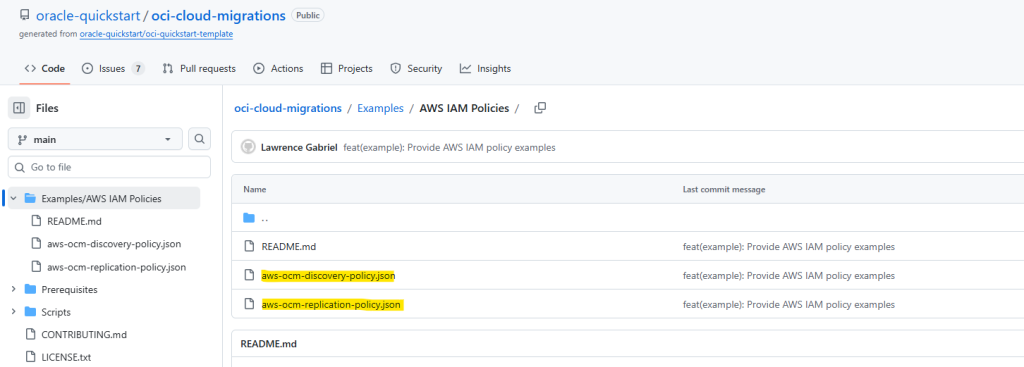
Oracle has made this approach very straightforward. You can navigate to the Oracle Quick Start GitHub repository for OCI Cloud Migrations:
https://github.com/oracle-quickstart/oci-cloud-migrations
There, you will find detailed guidance, including the required AWS IAM privileges needed for migration.
For AWS setup, you primarily need two main IAM policies:
- Discovery Policy
This policy allows OCI Cloud Migrations to discover and assess your AWS resources (such as EC2 instances, networking components, and storage). - Replication Policy
This policy enables the replication of workloads from AWS to OCI, including access required for data transfer and synchronization.
Discovery Policy
{
    "Version": "2012-10-17",
    "Statement": [
        {
            "Effect": "Allow",
            "Action": [
                "ec2:DescribeInstances",
                "ec2:DescribeInstanceTypes",
                "ec2:DescribeVolumes",
                "ce:GetCostAndUsageWithResources",
                "cloudwatch:GetMetricData",
                "cloudwatch:GetMetricStatistics"
            ],
            "Resource": "*"
        }
    ]
}
Replication Policy
In the Resources section for Instances and Volumes, ensure that you replace the placeholder value with your actual AWS Account ID.
{
    "Version": "2012-10-17",
    "Statement": [
        {
            "Effect": "Allow",
            "Action": [
                "ebs:ListChangedBlocks",
                "ebs:ListSnapshotBlocks",
                "ebs:GetSnapshotBlock"
            ],
            "Resource": "arn:aws:ec2:*::snapshot/*"
        },
        {
            "Effect": "Allow",
            "Action": [
                "ec2:CreateSnapshots",
                "ec2:CreateTags"
            ],
            "Resource": [
                "arn:aws:ec2:*:<<ACCOUND_ID>>:instance/*",
                "arn:aws:ec2:*:<<ACCOUND_ID>>:volume/*",
                "arn:aws:ec2:*::snapshot/*"
            ]
        },
        {
            "Effect": "Allow",
            "Action": [
                "ec2:DescribeInstances",
                "ec2:DescribeVolumes",
                "ec2:DescribeSnapshots"
            ],
            "Resource": "*"
        }
    ]
}
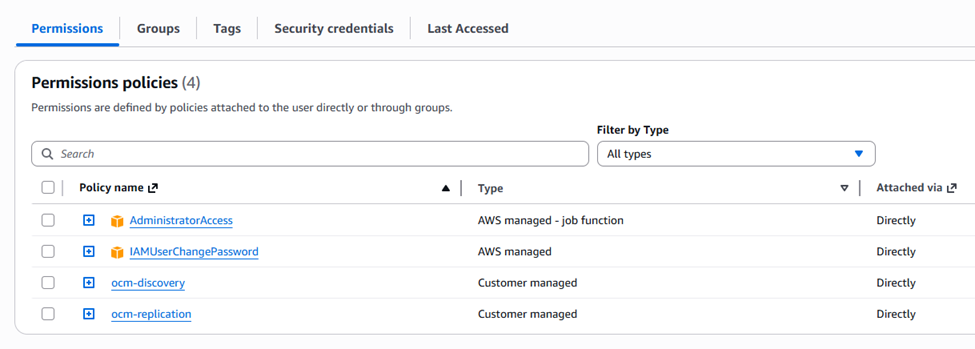
Below are the AWS IAM policies required to enable OCI Cloud Migration.
These policies grant the necessary permissions for both discovery and replication of your AWS resources. Make sure they are attached to the IAM user that will be used for the migration process.
Create a Secret Key for the AWS User
Now, create a Secret Access Key for the respective IAM user that will be used in AWS for replication.
This secret key will be used by the OCI Cloud Migration service to authenticate and perform replication tasks from AWS to OCI securely.

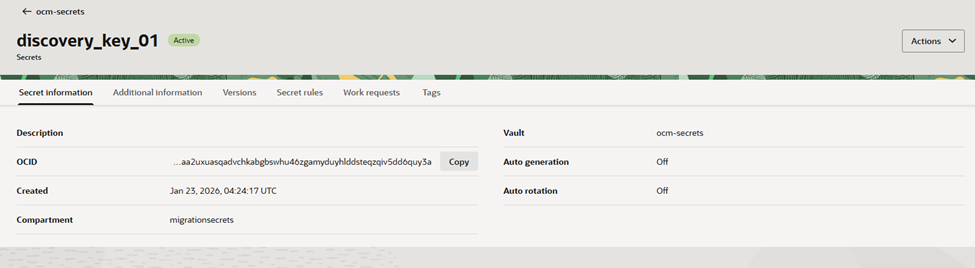
On the OCI side, you need to create a Vault and store the Discovery key inside it.
This key will be securely used by the Oracle Cloud Migration service to access and discover your AWS EC2 instances during the migration process.
Make sure the Vault is created in the appropriate compartment (typically the Migration Secrets compartment). That proper access policies are configured to allow the migration service to read the secret.
Create Asset Discovery
The first stage of any VM migration is the Discovery Phase. During this step, Oracle Cloud Infrastructure (OCI) Cloud Migration Service helps identify and collect all the required source assets before initiating the migration.
This phase is critical because it:
- Discovers virtual machines
- Collects configuration details (CPU, memory, storage, network)
- Identifies dependencies
- Validates connectivity and permissions
Accurate discovery ensures proper planning and avoids issues during the execution phase.
As shown in the figure below, it is important to select the correct Asset Source Type based on your environment.
For this testing scenario, we select AWS as the source environment, since we are migrating virtual machines from AWS to OCI. Choosing the correct source ensures that the migration service can properly authenticate, discover, and map the workloads to OCI resources.
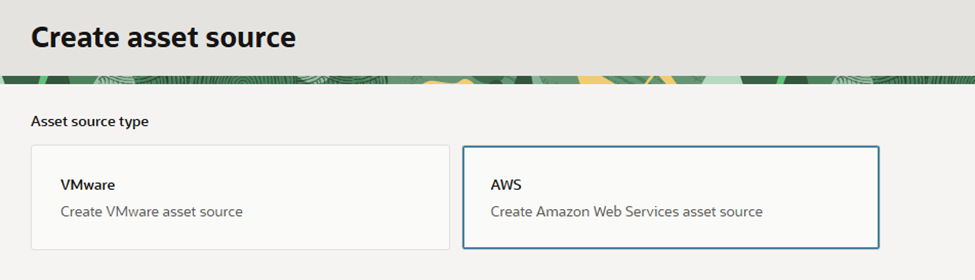
Figure 9 illustrates the steps to create the Asset Source within OCI Cloud Migration Service.
During this step, you must provide the following details:
OCI Compartment – The target compartment in OCI where the discovered assets and migration resources will be managed.
AWS Account ID – The source account from which the workloads will be discovered
Region – The AWS region where the virtual machines are hosted
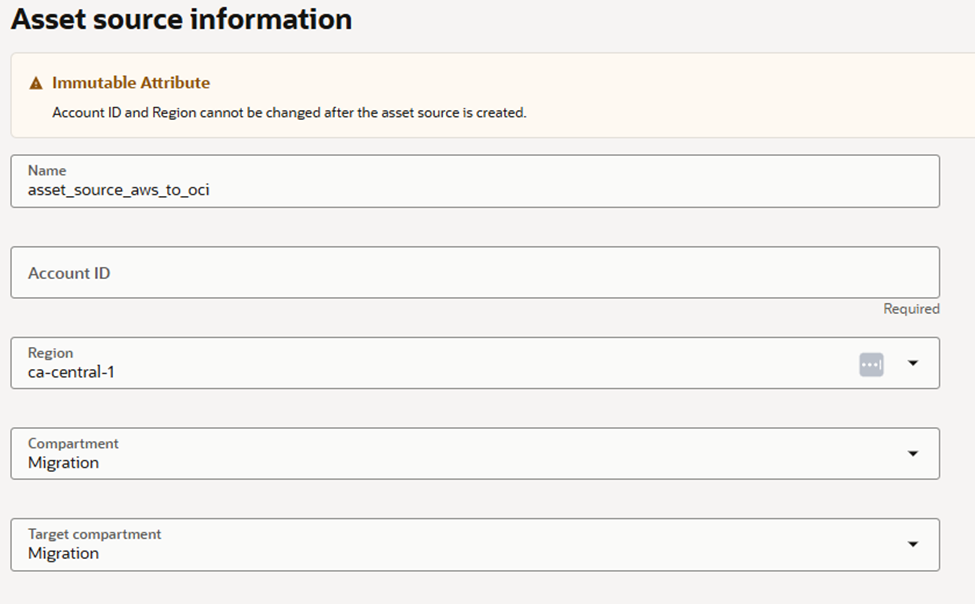
Figure 10 we need to select the respective remote connection.
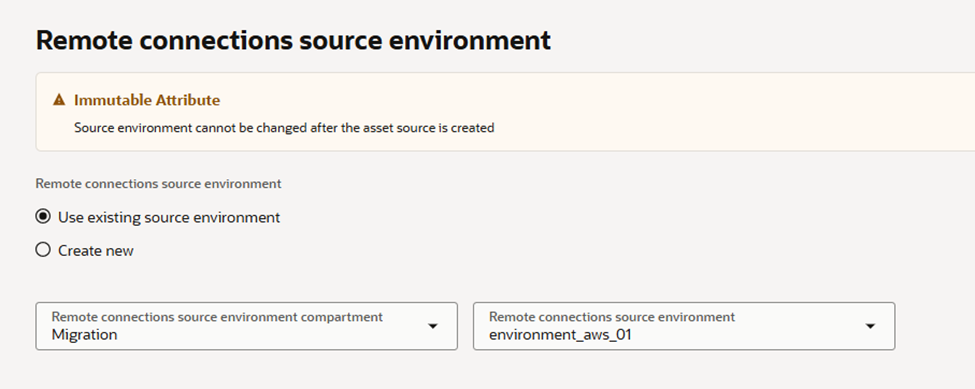
Figure 10 shows the step where you need to select the appropriate Remote Connection.
This connection defines how the Migration Agent communicates securely with your source environment. Choosing the correct remote connection ensures that OCI can access the source assets for discovery and migration without any connectivity issues.
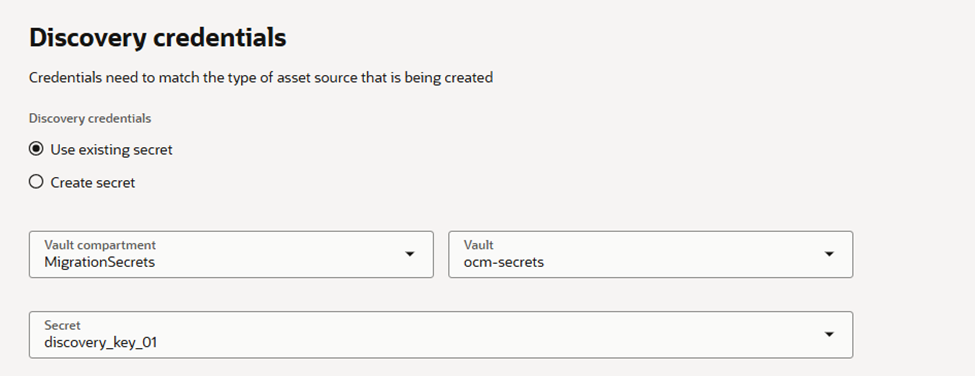
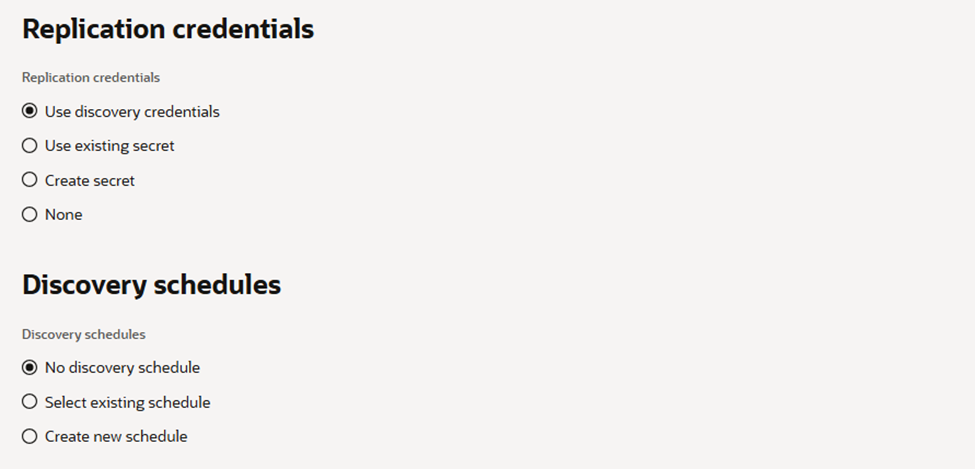
Figure 12 illustrates how to set up replication.
This step enables the migration service to replicate data from the source environment to OCI, ensuring that workloads are synchronized and ready for a smooth cutover during the migration process.
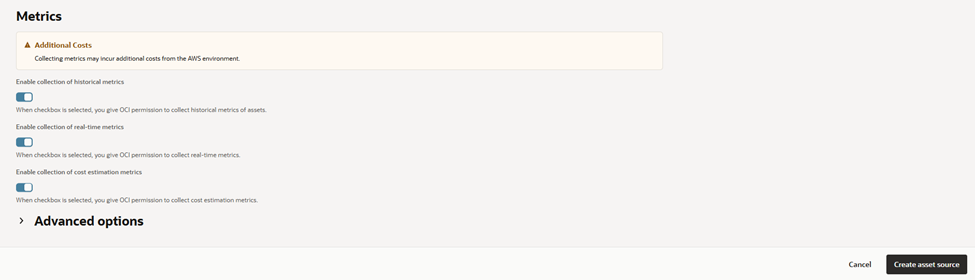
The final step is to select the metrics for connectivity.
These metrics help determine the optimal VM shape in OCI by analyzing resource requirements such as CPU, memory, and network usage, ensuring the migrated workload performs efficiently in the cloud.
In the next article, I’ll walk you through how to create a Migration Project and build a Migration Plan in OCI, guiding you step by step from planning to execution.
Conclusion
In today’s multi-cloud era, choosing the right cloud provider has become increasingly complex as hyperscalers continuously introduce new services, AI capabilities, and platforms. Organizations must evaluate not only performance and cost but also AI readiness, resilience, portability, and scalability when planning cloud adoption or migration.
While many organizations initially adopted AWS due to its early market presence, modern cloud strategies require evaluating multiple providers for workload migration, disaster recovery, and high availability. Oracle Cloud Migration Service within OCI provides a comprehensive solution for these needs, offering automated VM migration, support for VMware environments, agent-based or agentless approaches, continuous replication, guided workflows, dependency mapping, and bulk migration capabilities.
By leveraging this service, organizations can simplify complex migrations, minimize downtime, and accelerate their transition to a resilient, cost-efficient cloud infrastructure.